
GhostInking™
Patented zero-latency wireless inking for natural, pen-to-paper collaboration.
GhostInking™ is ScreenBeam’s patented technology that eliminates the delay traditionally seen with wireless inking. It delivers instantaneous, natural handwriting and annotation on any interactive display connected wirelessly to a Windows device—providing a true pen-to-paper experience without apps, cables, or proprietary tools.
With GhostInking™, writing feels exactly like pen on paper, enabling smooth collaboration in classrooms, meeting rooms, and training environments.
Key Benefits
Zero-Latency Inking
Ink appears instantly and precisely where the pen touches—no lag, no jitter, no visual delay.
Native, App-Free Experience
Works out of the box with Windows Ink, Microsoft 365 apps (PowerPoint, OneNote, Whiteboard), and other native tools. No applications or plugins required.
Natural Pen-to-Paper Feel
Predictive backfill technology tracks pen movement ahead of the final mark, ensuring the display perfectly mirrors real handwriting.
Consistent Performance Across All Displays
Compatible with any interactive flat panel or projector—no proprietary panels required.
Built for Modern Collaboration
Enables annotation, markups, brainstorming, and guided instruction without sacrificing mobility or user experience.
How It Works
When a user writes on an interactive display, GhostInking™ uses predictive backfill to follow the pen or finger in real time. As the user moves:
- The ink line visually tracks ahead to maintain perfect alignment
- The permanent ink mark fills in seamlessly behind
- Even fast movements appear instantaneous
This patented mechanism enables one of the world’s most natural wireless inking experiences.
Why It Matters
Where precision is essential
Math, engineering, design, and technical subjects demand ink that keeps up. GhostInking™ preserves accuracy during fast handwriting and detailed markups, eliminating the lag that disrupts teaching and explanation.
Where mobility improves engagement
Teachers and presenters can move freely while annotating on the shared display. No cables, no being stuck at the front, no waiting for ink to “catch up.” The experience feels natural to the audience and the instructor.
Where collaboration needs momentum
Meetings, workshops, and brainstorms thrive when ideas flow quickly. GhostInking™ removes the friction of laggy digital ink, allowing teams to sketch, highlight, and iterate in real time without breaking focus.
Where every second matters
Executives, trainers, and facilitators can annotate confidently in front of clients or large groups without awkward delays or technical interruptions—maintaining credibility and keeping attention where it belongs.

What Makes GhostInking™ Unique
- Patent-Protected Innovation: No other wireless display platform offers true zero-latency inking.
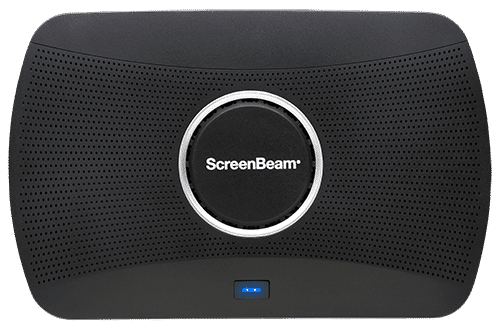
- Exclusive to ScreenBeam Devices: Available on ScreenBeam 1100 Plus, 1100 FLEX, and 1000 EDU Gen 2.
- Display-Agnostic Design: Works with any interactive screen—perfect for scalable deployments.
- Native Windows Integration: Fully supports Windows Ink, Microsoft 365 apps, and modern collaboration workflows.
How GhostInking™ Compares
| Capability | GhostInking™ (ScreenBeam) | Typical Wireless Inking |
|---|---|---|
| Latency | Designed to remove visible latency; ink appears instantaneous on supported ScreenBeam receivers. | Latency varies; delays are common due to encoding/decoding and network conditions. |
| Writing Feel | Natural, true pen-to-paper experience with ink aligned to the pen at any speed. | Writing can feel delayed or disconnected, especially during fast strokes. |
| Technology | Patented predictive backfill tracks ahead of the pen to maintain perfect alignment. | Most rely on streaming video only; no predictive inking to compensate for lag. |
| Apps Required | App-free for Windows inking; works natively with Windows Ink & Microsoft 365 apps. | Many solutions require proprietary apps or plugins for annotation. |
| Display Compatibility | Works with essentially any HDMI interactive display or projector. | Compatibility varies; some tie advanced features to specific display brands. |
| Precision | Maintains tight alignment even during rapid handwriting. | Higher latency can cause ink offset or trailing. |
| Learning Curve | Feels like direct/wired inking, minimal adjustment needed. | Users often adjust to delayed visual feedback. |
| Best Use Cases | Live teaching, whiteboarding, markups, real-time collaboration. | Basic mirroring or light annotation where slight lag is acceptable. |
GhostInking™ is a cornerstone of ScreenBeam’s commitment to deliver More Than Wireless Display. Combined with multi-view sharing, integrated whiteboarding, flexible connectivity, and secure app-free workflows, ScreenBeam transforms shared displays into dynamic collaboration hubs.
Bottom Line
GhostInking™ is a breakthrough in wireless collaboration—bringing zero-latency, natural handwriting to any space. With patented technology and seamless integration into ScreenBeam’s wireless display platform, organizations can finally enjoy the flexibility of wireless without compromising the precision and feel of pen-to-paper interaction.