

Virtual ScreenBeam
Software Platform • Virtual ScreenBeam Core
The ScreenBeam experience, now as software.
Now ScreenBeam can power more rooms. Virtual ScreenBeam adds BrowserCast-based sharing along with Orchestrate Go right to your android enabled display for enhanced collaboration and moderation without the need for a hardware receiver.
Priced from $50–$80 per screen / year
30-day free trial · No credit card required
For Android 8+ displays with internet access.
Pricing varies by license quantity and subscription term.
Uses the display you have
For rooms with a supported Android display, ScreenBeam runs right on it.
You stay in control
Preview every screen first. Accept, deny, queue, or spotlight.
Easy to join and manage
Presenters join from a browser. IT manages it all from CMS Cloud.
Welcome to Virtual ScreenBeam with Orchestrate Go
– the trusted ScreenBeam wireless presentation experience, reimagined entirely as software. Running directly on your supported Android-based displays with no dedicated hardware to buy, mount, or manage, it brings effortless browser-based sharing together with robust moderation tools.
What is Virtual ScreenBeam?
ScreenBeam, now in more rooms.
For years, ScreenBeam has powered wireless screen sharing through our receivers. Virtual ScreenBeam brings that same experience as software that runs right on supported interactive displays.
VSB Core is the first solution on the platform. It brings Orchestrate Go to rooms where the host decides what’s shared.
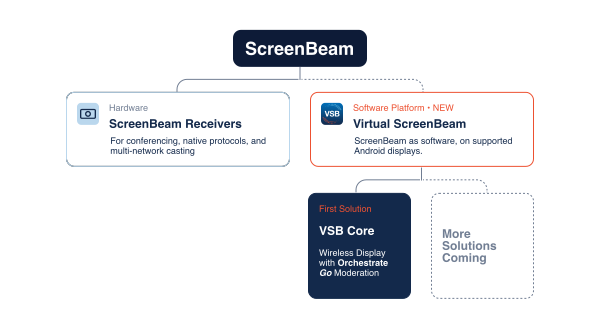
VSB Core
Share freely. Stay in control.
Virtual ScreenBeam with Orchestrate Go gives the host everything needed to keep the screen on track.
CMS Cloud
IT manages rooms and licenses in one place.
BrowserCast
Share from any browser with a PIN. No app to install.

Multiview
Show up to 4 screens side by side.
Presenter control
Manage who is presenting, right from the host view.
Queuing
Line presenters up so every turn is smooth.
Preview
See a live thumbnail first. Then accept or deny.
Moderation
The host decides who shares and when.
Spotlight
Put one presenter full screen in a tap.
How it Works
Up and running in three steps
2
Deploy from CMS Cloud
IT deploys and manages Virtual ScreenBeam Core from CMS Cloud. An MDM is recommended for easy rollout.
3
Share with a PIN
Presenters open a browser and enter the PIN. The host decides what goes on screen.
One ScreenBeam experience, two ways to get it
Pick what fits your room.
HARDWARE
ScreenBeam receivers
| Best for | Rooms that need conferencing, native protocols, or multi-network casting |
| Works with | Most displays and TVs |
| Setup | Receiver connects to the display |
| How people share | Native casting protocols, plus apps |
| Networks | Multi-network casting over internal and external networks |
SOFTWARE · NEW
Virtual ScreenBeam (VSB Core)
| Best for | Rooms with a supported Android display |
| Works with | Android 8+ displays |
| How people share | Cast from a browser with a PIN |
| Networks | Internet access |
| Setup | Software, managed in CMS Cloud |
Not sure which is right? Talk to a ScreenBeam Rep and we’ll help you choose.
Requirements
What you need to run Virtual ScreenBeam Core
Display
For best performance use a commercial-grade display.
- A display running Android 8 or higher
- Connected to a network with internet access
- Works on interactive flat panels
Network
For best performance, use a reliable, high-speed network connection.
- Ethernet: 1 Gbps or better
- Wireless: 802.11ac 5 GHz for best performance
- Ping response under 15 ms for stable performance
Recommended
MDM. An MDM makes it easier to deploy and manage VSB Core across many displays. It is recommended, not required.
Free Trial
Try it free on your own display first.
Preview what gets shared, control who presents, and see how easy it is to join. 30-day trial. No credit card.
Try it free on your own display first.
- An Android 8+ display
- Internet access
- MDM recommended, not required
Does it work with my current ScreenBeam receiver?
No. Virtual ScreenBeam Core runs on supported Android-based interactive displays. Your ScreenBeam receivers keep working as they do today.
Do presenters need to install anything?
No. Presenters open a web browser on their device and enter the PIN shown on the display
Which displays are supported?
Virtual ScreenBeam Core works on interactive flat panels running Android 8 or higher, connected to a network with internet access.
Do I need an MDM?
No, but we recommend one. An MDM makes it easier to deploy and manage Virtual ScreenBeam Core across many displays.
How is Virtual ScreenBeam Core managed?
Through CMS Cloud. IT deploys VSB Core, manages rooms, and tracks licenses in one place.
What happens when my trial ends?
When your trial ends, your Virtual ScreenBeam subscription will become inactive. To continue using Virtual ScreenBeam without interruption, purchase a subscription before your trial expires.
Wireless screen sharing, virtually.
The ScreenBeam experience, right on your supported display.