
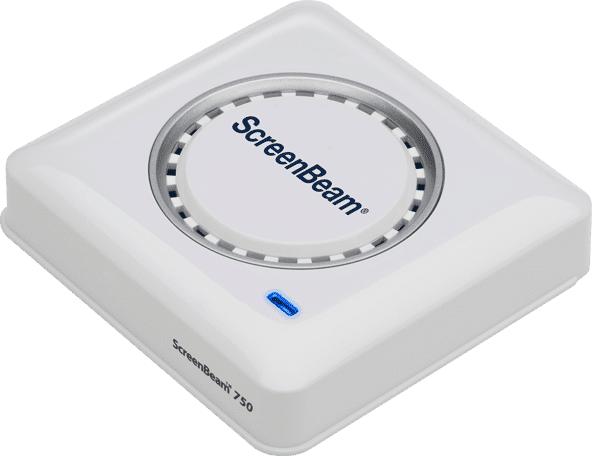


Products / ScreenBeam 750
ScreenBeam 750
Wireless Display Receiver
Model#: SBWD750W
This product is end-of-life.
Wi-Fi Miracast wireless presentation receiver for compatible Windows and Android devices.
Classroom – Refer to ScreenBeam 1000 EDU Gen 2
Meeting room – Refer to ScreenBeam 1100 Plus
Product Highlights
- Wireless display receiver for Windows and Android
- Duplicate or extend screen mirroring
- Include Central Management System (CMS) software
Ideal Space:
Classroom, Meeting Room
App-less and dongle-less screen mirroring
Screen sharing from any device without the need to download an app or keep dongle nearby. ScreenBeam leads with OS-native Wi-Fi Miracast for familiarity and mitigate user training.
Extended desktop
Windows users can mirror desktop or extend screen to ensure content privacy.
Centralized Management
ScreenBeam CMS Enterprise included for monitor, manage, and update.
Compatible OS/Device
Miracast: Windows 10/8.1 and Android
Video: H.264 compression
Audio: LCPM 2.0
Content Protection2: HDCP 2.x
Resolution1: Up to 1080p30
Wireless
Miracast P2P: 802.11ac dual band (non-DFS)
Accessories
- USB-WLAN adapter or USB-Ethernet adapter
- HDMI-to-VGA adapter
Interface
- 1 x HDMI Output
- 1 x USB 2.0 Host Type-A
- 1 x DC Power Jack
Power
Input: 5VDC, 2A
Consumption: <5W
Physical
Dimensions: 6.61 x 6.61 x 1.36 inch (168.0 x 168.0 x 34.5 mm)
Operating temperature: 0 ºC to 40 ºC (32 ºF to 104 ºF)
Storage temperature: 0 ºC to 70 ºC (32 ºF to 158 ºF)
Operating humidity: 10 to 85%, non-condensing
Storage humidity: 5 to 90%, non-condensing
Regulatory and Compliance
North America: FCC, IC, UL, CE, SRRC, C-Tick, RoHS and WEEE
Warranty
Localized to country of sale
Current Release
Version: 2.15.46.0
- Release date: 2021, Jun 01
- Changes since 2.15.45.0
- Notes: The new default login password is now “screenbeam” if one of the following scenarios applies:
- You have a brand new ScreenBeam receiver with version 2.15.44.0 (or later)
- A force firmware update to 2.15.44.0 (or later) is applied to the ScreenBeam receiver
- The ScreenBeam receiver has been restored to factory default post 2.15.44.0 (or later) firmware update
- Improvements and fixes
- Improve Miracast connection stability
- Fixed issue where the receiver may auto-reboot due to the oversized event log
- Fixed WiFi network name can’t support the “_” character
- Fixed issue where some receivers may show blue/black onscreen and is offline in CMS
- Improve system security
Previous Releases
Version: 2.15.45.0
- Release date: 2020, Nov 06
- Changes since 2.15.44.0
- Improvements and fixes
- Improves Miracast connection stability for Windows 10 build 19H1/19H2/20H1 (#9805)
- Updated behavior for the Display Off state to resume only when waking On Connect or On Scan by a client device (#11310)
- Fixed bug where CMS fails to set NTP time server (#11128)
- Fixed bug where time zone and daylight-saving time settings can be reset to default by CMS (#11180)
- Fixed bug where an unexpected black screen may occur after a projector/display is turned off completely (not sleep) and back on (#10865)
- Fixed bug where ScreenBeam cannot be seen from Miracast client devices after a crash event occurred and could not self-recover (#9791)
- Fixed bug where ScreenBeam cannot be seen from Miracast client devices after the P2P Operation Channel is changed (#10891)
- Fixed bug where the receiver may continuously fail to connect to CMS server (#9992)Fixed issue where ScreenBeam may connect to the wrong
- CMS server address if “aeisbcms” hostname and FQDN pointing to different IP (#9873)
- Provides CMS the ability to export receiver MAC address from CMS (#9563)
- Deprecates support for Rx Log upload timer (#9420)
Windows desktop Central Management System (CMS)
Version: 2.6.14.0
Release notes: Windows desktop Central Management System (CMS) application for ScreenBeam 960 and 750 models.
Case Studies
At St. Petersburg College, ScreenBeam technology has become a cornerstone of the school’s commitment to innovation. Helping create seamless, connected learning environments across its campuses.
Flint Cultural Center Academy replaced existing consumer-grade wireless display with ScreenBeam in their classrooms and meeting spaces because of its ability to address a wide array of use cases and meet user experience, remote management and security considerations.
Responding to the growing demand for hybrid learning, Palm Beach State College deployed the ScreenBeam 1100P to streamline wireless interactions and better serve the diverse learning needs of their extensive commuter population.
James Cook University moves to hassle-free presentations with ScreenBeam 1100 Plus transforming its classrooms into secure hybrid learning spaces. The result has revolutionized the way staff works elevating team productivity to new levels and positioning the University as an innovation leader in their regions.
Founded by the Sisters of The Society of the Sacred Advent, both St. Margaret’s Anglican Girls’ School and St. Aidan’s Anglican Girls’ School are situated in the picturesque, leafy suburbs of Ascot and Corinda, Brisbane, Queensland Australia. The schools pride themselves on their excellence in innovative teaching and learning complemented by a broad range of extra-curricular activities.
Request A Trial
Experience a world where technology fades into the background and meaningful, interactive experiences take center stage.
ScreenBeam needs the contact information you provide to us to contact you about our products and services. You may unsubscribe from these communications at any time. For information on how to unsubscribe, as well as our privacy practices and commitment to protecting your privacy, please review our Privacy Policy.
Schedule A Demo
Experience a world where technology fades into the background and meaningful, interactive experiences take center stage.
ScreenBeam needs the contact information you provide to us to contact you about our products and services. You may unsubscribe from these communications at any time. For information on how to unsubscribe, as well as our privacy practices and commitment to protecting your privacy, please review our Privacy Policy.